With Subversion, this can by done by deleting the stable code line and re-creating it from the new feature one via svn copy. Developers update their checkout of the stable code line to get the latest source tree. The stable code line's history will show the deletion and subsequent copy from the new feature code line.
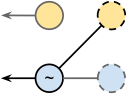 With Git, one way to do this is to create a new stable code line by branching the new feature code line. History for the old stable code line effectively disappears as there is no way to reach the old stable commits from the new branch HEAD. The history will also not show that the stable code line was recreated as it will simply inherit all history from new feature (stable becomes a named reference to the same commit as newfeature). A reset HEAD~ on the new stable branch would move you back to prior newfeature commits rather than prior stable ones (the latter being the likely intent). If you take this approach, you may want to tag the "last" stable commit before the branch was re-created. Also note that using this model, you typically have to use the --force option when pushing this change, since the latest stable commit will not be a child of the remote HEAD. Additionally, this would have caused the stable code line history to "originate" from newfeature, which is not what I wanted.
This approach also forces developers to perform some sort of client-side reset since there is no relationship between the old stable code line and the new. Additionally, a developer who (perhaps unintentionally) tries to merge the new stable code line onto their old (local) copy may run into conflicts and will reintroduce commit history which was intended to exist only in the old code line. Developers could re-create their local stable branches by deleting and re-branching from origin/stable, or by using the reset command. For developers who are new to Git, this may be daunting and require assistance from a local Git expert.
To make this easier on developers and make the history reflect the branch refresh, my intention was to create a commit which made the contents of the stable code line match newfeature while allowing a developer to apply this change as a fast-forward.
I started with a stable branch and a newfeature branch with the following HEAD commits.
$ git show --format=raw stable
commit 257a33187c5609de59578d0dfdb4633e83f3a6f5
tree db2dbcf8136a2ebb1eb7601ac8857850bb4d803f
parent 3a4e4655e3d064227b7b0a071707bcbbda756bbb
author Example User <user@example.com> 1334380489 -0700
committer Example User <user@example.com> 1334380489 -0700
Minor change
diff --git a/bar b/bar
index 257cc56..cbdbed2 100644
--- a/bar
+++ b/bar
@@ -1 +1,2 @@
foo
+foo too
$ git show --format=raw newfeature
commit f437becce4d71caae02c71a148c9fe3c1aa79a33
tree 91eeb5e6d9e74d71adadad473771e050b8786ab3
parent 6950c0de35c85ea33f666a45f8df9856c2cc2b67
author Example User <user@example.com> 1334380773 -0700
committer Example User <user@example.com> 1334380773 -0700
Add empty foo
diff --git a/foo b/foo
new file mode 100644
index 0000000..e69de29
Initially, I tried using the "ours" merge strategy. To make stable (theirs) look like newfeature (ours), I would have to merge stable into newfeature. However, I didn't want newfeature's history to advance, since it was only the stable branch that should change during this refresh (the graph for the new commit should be directed away from newfeature).
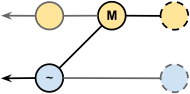 Creating a branch from newfeature initially seemed to work, but because stable was the "other" branch, it becomes the second parent commit whereas I wanted it to be the first. In this case, a reset HEAD~ leaves the working copy on a newfeature commit.
$ git checkout -b stable_temp newfeature
Switched to a new branch 'stable_temp'
$ git merge -s ours stable
Merge made by the 'ours' strategy.
$ git checkout stable
Switched to branch 'stable'
$ git merge stable_temp
Updating 257a331..b2be7ad
Fast-forward
bar | 3 +--
baz | 1 +
too/foo | 2 ++
3 files changed, 4 insertions(+), 2 deletions(-)
create mode 100644 baz
create mode 100644 foo
create mode 100644 too/foo
$ git branch -d stable_temp
Deleted branch stable_temp (was b2be7ad).
$ git show --format=raw stable
commit b2be7ad272cc767461310f897dbf6430ad95c402
tree 91eeb5e6d9e74d71adadad473771e050b8786ab3
parent f437becce4d71caae02c71a148c9fe3c1aa79a33
parent 257a33187c5609de59578d0dfdb4633e83f3a6f5
author Example User <user@example.com> 1334380832 -0700
committer Example User <user@example.com> 1334380832 -0700
Merge branch 'stable' into stable_temp
If you try this the other way around (merging newfeature into stable using the "ours" merge strategy), you end up with the parent commits ordered correctly but using the tree from stable).
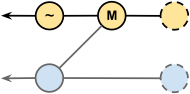 The solution is to create a merge commit with its first parent as the latest stable commit and its second parent and tree identifier from the most recent newfeature commit. I couldn't find a way to do this with the merge command, so I created a synthetic commit using some lower-level Git tools. A reset HEAD~ leaves the working copy on the previous stable commit.
$ git show --format=raw newfeature | grep ^tree
tree 91eeb5e6d9e74d71adadad473771e050b8786ab3
$ git checkout stable
Switched to branch 'stable'
$ echo "Refreshed 'stable' branch to match 'newfeature' tree" | \
git commit-tree 91eeb5e -p stable -p newfeature | \
xargs git merge
Updating 257a331..7269777
Fast-forward
bar | 3 +--
baz | 1 +
too/foo | 2 ++
3 files changed, 4 insertions(+), 2 deletions(-)
create mode 100644 baz
create mode 100644 foo
create mode 100644 too/foo
$ git show --format=raw stable
commit 7269777c640403b00dd2a60bf69a738e6f052a21
tree 91eeb5e6d9e74d71adadad473771e050b8786ab3
parent 257a33187c5609de59578d0dfdb4633e83f3a6f5
parent f437becce4d71caae02c71a148c9fe3c1aa79a33
author Example User <user@example.com> 1334381250 -0700
committer Example User <user@example.com> 1334381250 -0700
Refreshed 'stable' branch to match 'newfeature' tree
With the second (correct) approach, the stable branch is the first parent and the tree is from newfeature.
You can then push the updated stable branch to any relevant remotes.
